The Bar Operating System
Is your bar running you?
Run your bar instead. One bar POS system to manage your menu, venue, inventory, and staff.
’86 restaurant software.
Texas pilot
Restaurant software wasn’t built for a bar.
’86 itTypical setupYou’re guessing at pour cost.
Inventory tracks every pour, every recipe line, every combo component — off the shelf as it rings in.
Real-time inventory trackingTypical setupHappy hour is a second set of buttons you rebuild by hand — often every day the specials change.
Scheduled pricing flips itself on and off — by day, by hour, down to the item. One menu, not two.
Happy hourTypical setupThe Wi-Fi drops mid-rush.
Offline mode keeps tabs opening and saving on the device — they sync themselves the moment the connection’s back.
Offline modeTypical setupYour numbers live in five different places.
Sales, cost, labor, tips, and Texas liquor tax in one place — one bill, one login, one support number.
One platformOne login instead of five.
ConsolidateSome of it is separate apps that don’t talk to each other — a POS, a bar-inventory tool, a tip-payout service, a scheduler. Some of it is a spreadsheet of pars, a clipboard of counts, paper checklists, and a wall of Post-its. BAR POS replaces the operational core of both.
| Function | Typical setup | In BAR POS |
|---|---|---|
| POS + card payments | A separate subscription | Stripe Terminal, pre-auth, card-on-file close, cash, receipt + drawer |
| Bar inventory | Spreadsheets + clipboard counts | Pour-level depletion, low-stock forecasting, substitution promptspurchase orders and supplier ordering coming soon |
| Tip payouts | A separate service, or manual math | Per-worker calculation, tip-outs, and recordscalculates every split; you keep your current payout method |
| Scheduling + time clock | A separate app, or a group text | Shift builder, recurring assignments, PIN time clockshift trades, availability, and messaging coming soon |
| Payroll | A separate add-on | Staff roles, rates, and hours — exports to any payroll systempopular payroll integrations coming soon |
| Liquor-tax compliance | Hand-tallied every month | Sales and mixed-beverage tax reporting, automatically calculatedTexas pilot now; more states soon |
One system to learn. One subscription. One support number.
See the whole bar from one screen.
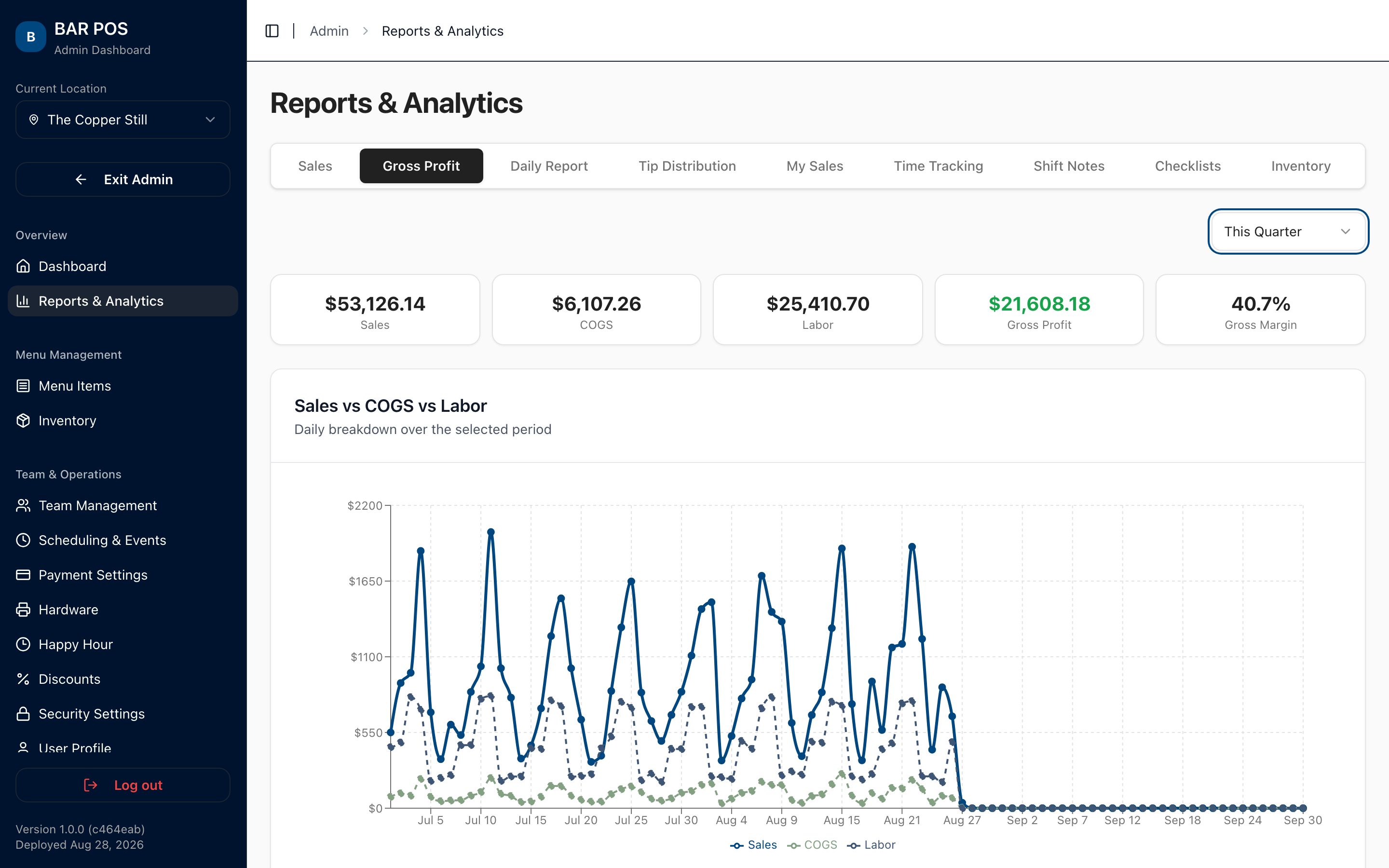
Owners & operators- Gross profit, not a monthly surprise. Sales minus cost of goods minus labor, charted by day — or by the hour for a single night.
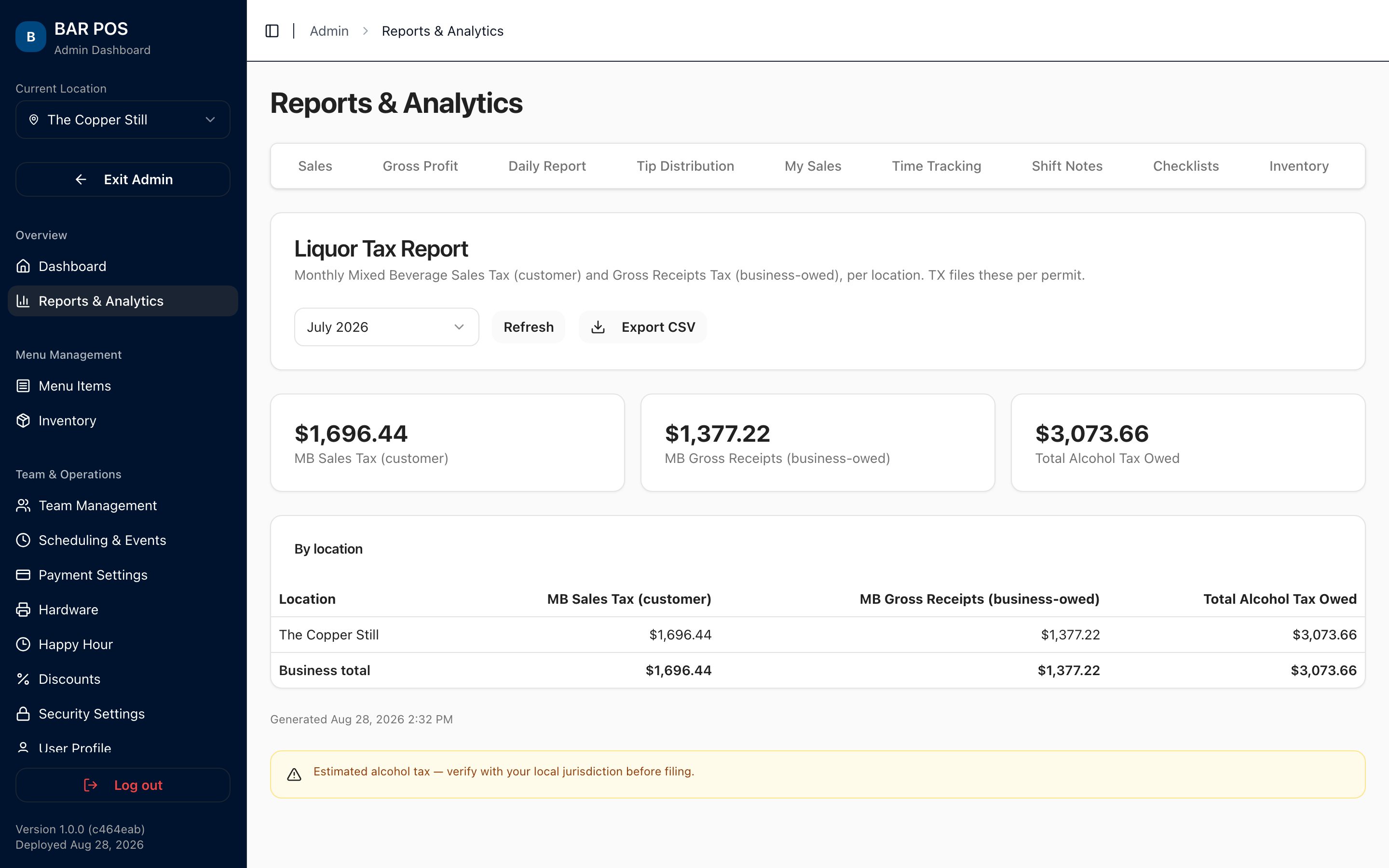
- Sales and liquor tax reporting, automatic. Every figure — sales tax, the customer-facing mixed-beverage tax, and the 6.7% gross-receipts tax — calculated per location by permit type, ready to hand to your accountant.Texas pilot now; more states soon.
- Compliance you can hand to an auditor. Every comp, void, and spill in one exportable summary.
- Multi-location from one login. Per-location hours, tip rules, permits, and pricing — then roll every report up with one toggle.
- Labor before payday. Build the schedule, run the time clock, and see overtime and gross wages before you cut checks.
- The close runs itself. Shift checklists and cash reconciliation are built into clock-out, so the last thing every night happens the same way.
- Exports from every report. CSV, everywhere.PDF export coming soon.
Every pour comes off the shelf.
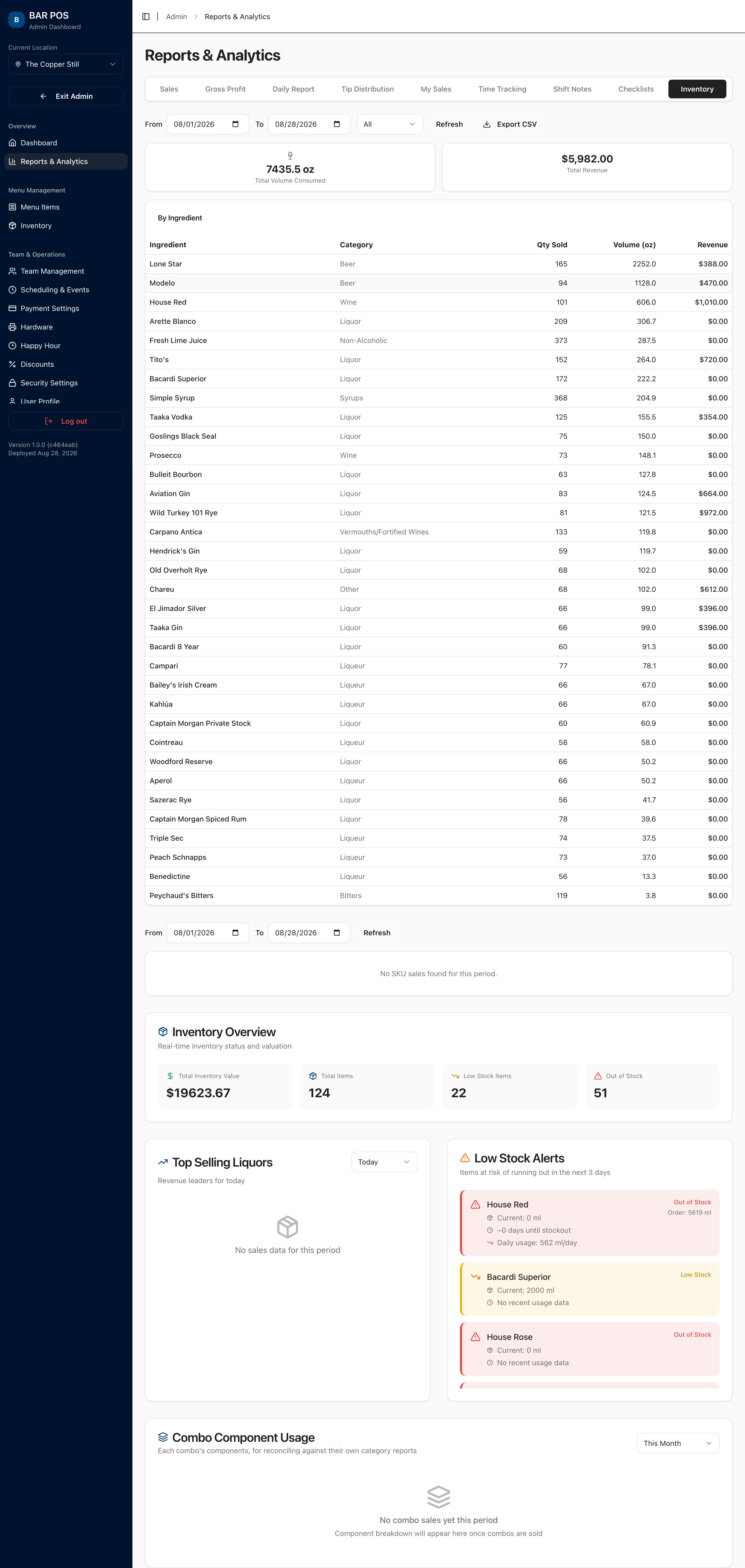
Live count- Recipes deplete by ingredient as drinks ring in — a running ledger, not a nightly estimate. Cocktails draw down every line, combos expand to their components.
- Voids put stock back. Comps don’t. The count stays honest either way.
- When a bottle runs dry, BAR POS rolls to the backup bottle automatically — or prompts the bartender for a substitution, right on the ticket.
- Low-stock forecasting by pour velocity tells you what to reorder before you run out.
- Physical counts reconcile against expected, priced to the dollar of variance.
- Purchase orders and supplier ordering — coming soon.
The rush doesn’t stop when the internet does.
Local-firstBartenders keep ringing in drinks and saving tabs with no error and no spinner. The sync queue retries with backoff, survives an app crash, and drains itself the moment the connection returns. It’s PIN-safe, so staff work straight through an outage with no owner login.
Straight talk
Card authorization still needs a connection — that part runs through the processor. Cash, tabs, and orders don’t.
Close the night with the numbers already done.
All CSV- Gross Profit. Sales − COGS − Labor, daily or hourly.
- Daily Report. The night, line by line.
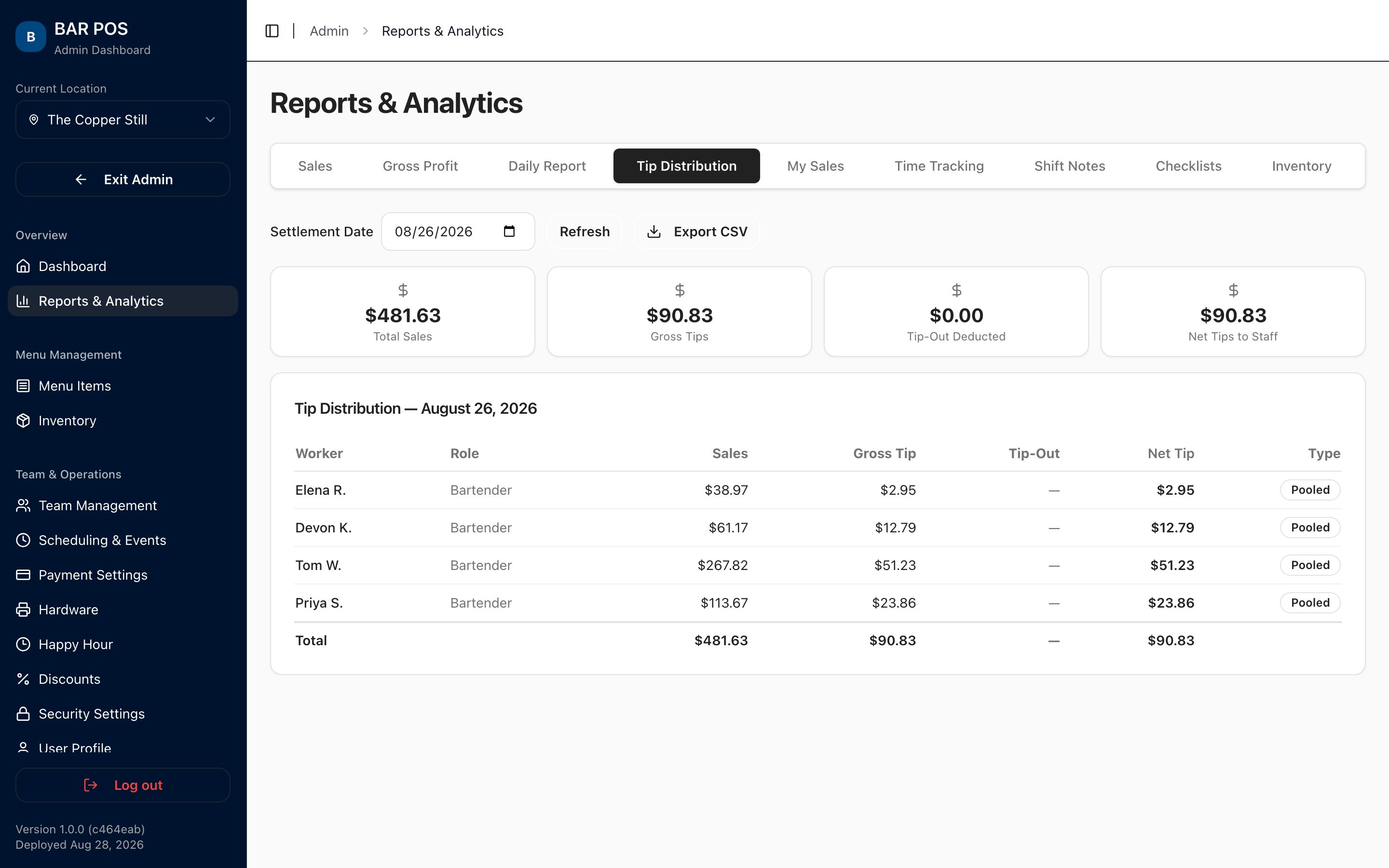
- Tip Distribution. Per worker, with tip-outs.
- Payroll. Roles, rates, hours — export-ready.
- Sales Tax. Calculated, by period.
- Liquor Tax. MB sales tax + gross receipts, per location.
- Compliance. Comps, voids, spills — auditable.
Fast enough for a Friday.
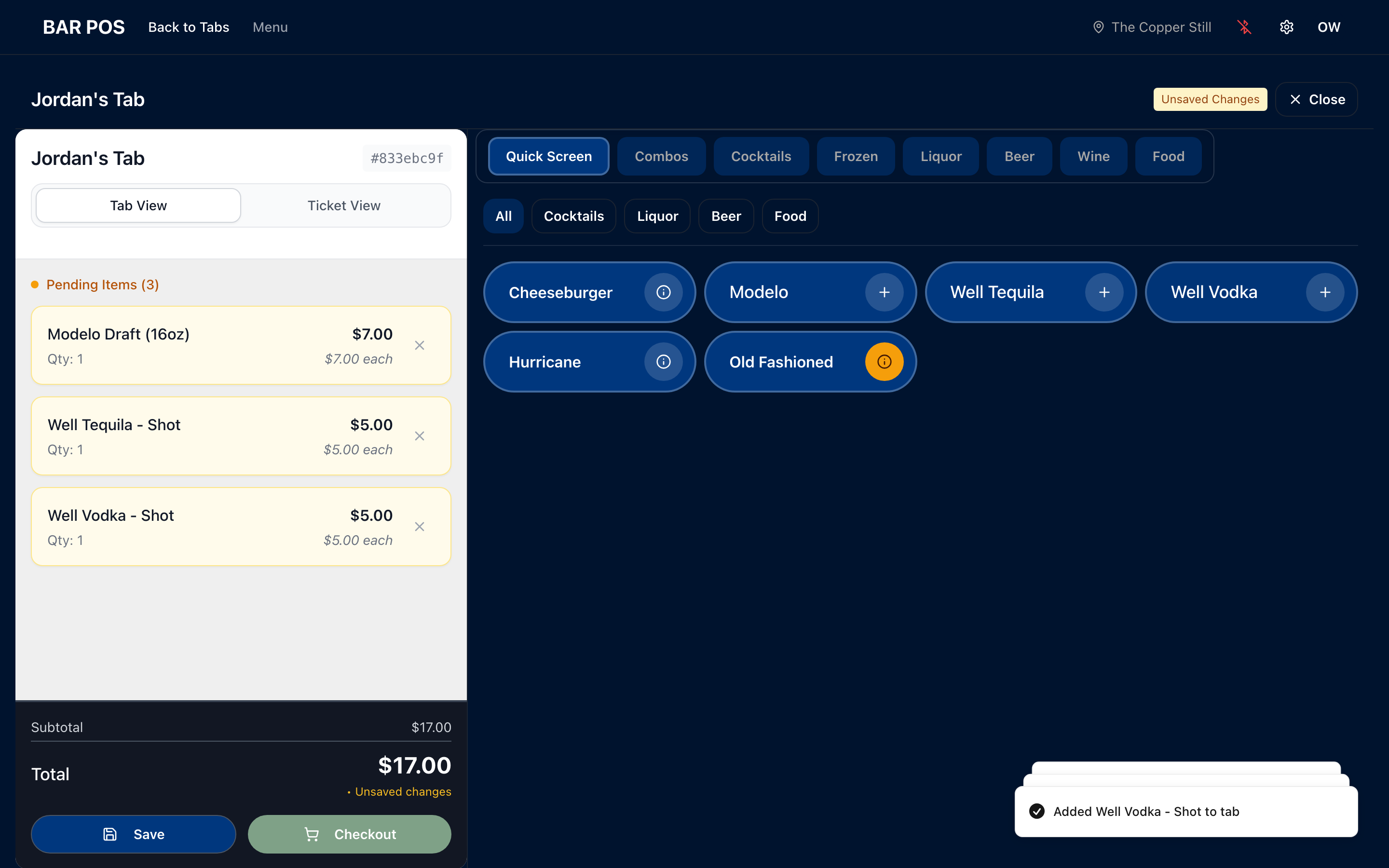
Behind the bar- Fewer taps to open a tab, ring a round, and close out.
- Fast tab and menu search — no scrolling a wall of buttons.
- Specs and photos on the button so every cocktail gets built right.
- Clock in, claim your tips, run the closing checklist, check the schedule — same app.
- Keeps working offline.
Delivering hospitality
No one owns a tab. Everyone owns the service.
BAR POS gets the software out of the way so your staff can pour, talk, and manage the room. Any bartender can ring on any tab. Sales roll up to the staff that rang the ticket. A shift change never inconveniences the guest. The card’s on file, so the goodbye isn’t a transaction.
Setup is easy.
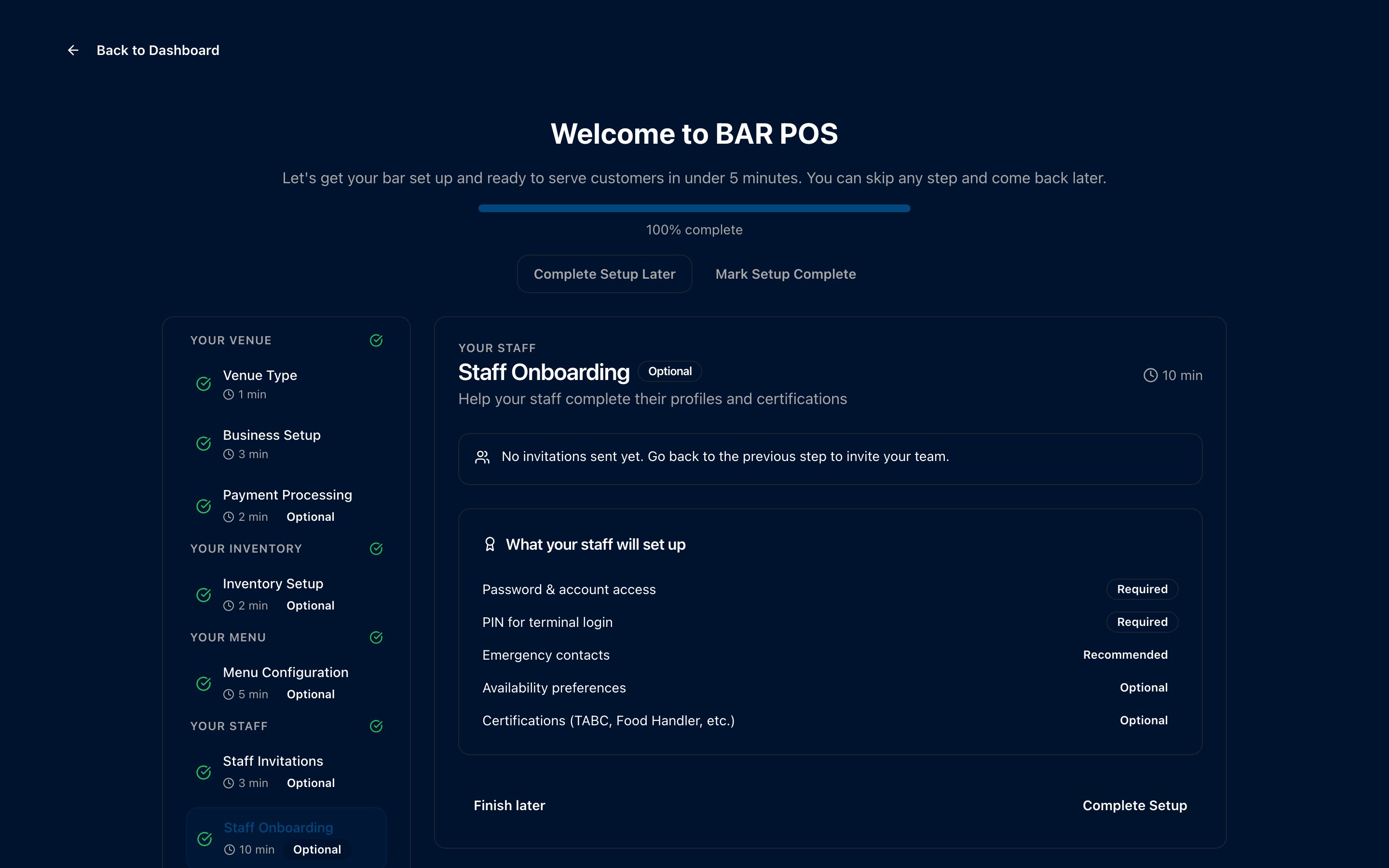
SetupNo month of late nights rebuilding your menu after close. A guided setup walks you through it, step by step.
- A step-by-step wizard covers your venue, payments, inventory, menu, and staff — in order, nothing skipped.
- Import inventory from a spreadsheet. Column mapping and duplicate detection are built in.
- Staff go live with a PIN. Invite the team, set roles, done.
- Annual plans get white-glove setup — we build your menu and inventory with you, and you open on it.
Simple pricing.
Per locationOne fee per location. Monthly or annual.
No per-terminal upcharge. No per-seat fee. Unlimited staff accounts and workstations. No long-term contract.
See full pricing →Frequently asked questions
FAQWhat is BAR POS?
BAR POS is an all-in-one operating system for bars. It runs point of sale, card payments, real-time liquor inventory, staff scheduling and time tracking, tip distribution, and liquor-tax reporting from one screen — and it keeps working when the internet drops.
How is BAR POS different from a restaurant POS?
Restaurant POS systems are built around table service and food menus. BAR POS is built for bar operations: fast tab handling, tap-to-open pre-authorizations, pour-level liquor inventory tied to recipes and combos, scheduled happy-hour pricing, and bar-specific tax reporting.
Does BAR POS track liquor inventory?
Yes. Every pour, recipe line, and combo component comes off the shelf in real time as it rings in, so pour cost and on-hand counts stay accurate without a manual count. You can import your starting inventory from a spreadsheet with column mapping and duplicate detection.
Does BAR POS help with liquor-tax compliance?
BAR POS calculates and reports the taxes a bar owes — including Texas mixed-beverage sales tax and the mixed-beverage gross-receipts tax — alongside sales, cost, and labor. Texas is supported first; more states are planned.
Does BAR POS work offline?
Yes. If the Wi-Fi drops mid-rush, tabs keep opening and saving on the device and sync automatically the moment the connection is back. No lost orders.
Is BAR POS a good alternative to Toast, Square, or SpotOn for a bar?
BAR POS is aimed at bars that find general restaurant POS systems a poor fit — especially for pour-level inventory, happy-hour pricing, tip handling, and liquor-tax reporting. It runs on iPad and Android tablets with a Stripe card reader, so hardware costs stay low.
What hardware do I need to run BAR POS?
An iPad or Android tablet at the bar, a phone for moving around, and a Stripe card reader for payments. Receipt printers and cash drawers are supported. The Hardware page lists specific tablet, reader, and printer picks with buy links.
What tablet should I use for a bar POS system?
Any current iPad or Android tablet works — BAR POS lists specific recommended and budget tablet POS hardware bundles (tablet, stand, printer, cash drawer, and card reader) for both platforms on the Hardware page, with buy links and network requirements.
How much does a bar POS system cost?
BAR POS is one flat fee per location — $99 per month, or less on an annual plan — with unlimited staff accounts and unlimited workstations. There is no per-terminal or per-seat charge and no long-term contract. See the Pricing page for current rates.
How does BAR POS handle tips?
BAR POS records card and cash tips per shift and distributes them by your rule — proportional to sales or evenly across a shift — then reports the payouts for payroll.
How long does setup take?
A guided wizard walks through your venue, payments, inventory, menu, and staff in order. You can import inventory from a spreadsheet, and staff go live with a PIN. Annual plans include white-glove setup where the team builds your menu and inventory with you.
Get on the early-access list.
Launching soon- Launch-day access. First bars in get the full system.
- White-glove setup. We build your menu and inventory with you — you open on it.
- Built by bartenders. Your feedback shapes what ships next.
- Early-adopter pricing. Locked-in rates for the first customers.
No commitment. We just keep you in the loop.